Instagram is soaring in popularity.
The platform boasted 800 million users in September 2017, up more than 30% percent from one year earlier.
If you’re just getting started with social media ads, Instagram can be a great place to begin

Whatever stage your business is at, making sure your Instagram strategy is up to date will help ensure enormous reach!
If you want to quickly build or amplify a loyal following, we’ve outlined specific tactics to help you achieve 1,000 new Instagram followers in just one month.
These strategies will quickly deliver. While many approaches exist for gradually building a community that sticks, these ideas will ensure sustainable results — in a fraction of the time.
This post expands on our 2016 post on the topic (which you can find at the bottom of the article).
These ideas are still relevant, but up top, we’ve provided the latest tips!
1. Be a Problem-Solver for Your Viewers
While nearly all brands conduct some form of audience research that underpins their social media strategy, few brands have succeeded in really adding value with their Instagram content.
To deliver something meaningful, ask yourself:
- Are you targeting the right segment of users?
- What types of questions is this audience thinking about?
- How can you help solve your audience’s issues in your ads?
If you’re just getting started and trying to figure out who to target with your Instagram ads, users who have engaged with your business before are an excellent place to begin. Since they are already curious about your products and services, existing users are likely to follow you on Instagram for the latest updates and rollouts!
Tips for beginners: If you have user emails or telephone numbers, you can create custom audiences with this data. You can get even more specific and build custom audiences for your ads based on users’ app activity or even Facebook video views. Targeting these highly active users will go a long way toward efficiently gaining new followers!
Creating custom audiences will help get your ads in front of the right people, but to make sure they become followers, you need to take it a step further and use the data to develop practical ads that will answer followers’ questions.
How do you know what their questions are?
You have lots of tools at your fingertips. For example, BuzzSumo’s question analyzer will return the most popular questions asked on forums, e-commerce sites, and Quora about the topic of your choice. For example, if you’re marketing a new pair of wireless headphones, here’s what people wanted to know about the product:

You can use this data to develop more-targeted ads. Help your users, and they will convert to followers! Other tools for this are Google Keyword and Social Mention.
When a brand succeeds at user research, the result is a more nuanced ad:

The sleepwear brand Lunya demonstrates how deliberate the company has been in understanding the lifestyle choices of their target audience. They’ve realized that this group is looking for loungewear that serves a range of purposes — from athletics to fashion to travel. The research clearly underpins the brand’s decision to highlight its products from several angles, opening viewers’ eyes to the products’ versatility.
It’s critical to understand who you are trying to reach at a granular level to capture their attention and convert them from a viewer to a follower.
2. Try a Cinemagraph
With the majority of Instagram advertisers focusing on either images or videos in a single frame, you have an opportunity to stand out from the crowd if you combine the two!
Cinemagraphs are still photographs that incorporate slight motion that plays in a brief, repeating loop:
 This movement has been called “Harry Potter-like.” It definitely adds a bit of magical allure to your ads and keeps the viewer on your post longer as they try to figure out what’s going on! You can publish cinemagraphs as animated GIFs or in other video formats.
If you have footage that you want to spruce up — or make regular photographs really pop in a viewer’s feed — the cinemagraph is an under-the-radar technique that can add that extra edge.
 Particularly if you want to be subtle about your promotion, a cinemagraph can draw attention to your content without forcing your product on the viewer. Here, an entrepreneur is able to showcase a Kronaby watch in a less flashy way, evoking a sense of calm and repose in nature instead — the opposite of what many viewers might expect from a technology ad.
This contradiction makes the piece more appealing.
In just two days, this cinemagraph had 23,109 views, showing how magnetic the format can be for drawing attention! The more attention, the more potential to add followers!
3. Create Distinct Story Ads for Maximum Reach
To rapidly build Instagram followers, use the Story ads format. Agencies report 2-3X more engagement with Instagram Stories than with regular content. Greater engagement leads to more (and more loyal) followers as they spend more time appreciating and understanding the nuances of your brand.
Instagram Stories have more than 250 million daily active users, representing close to 50% of the entire platform’s DAUs. What’s more, DAU growth has increased 150% from October 2016 to June 2017.
 [Source]
With such explosive popularity, the Stories feature is obviously key to quickly reaching an enormous segment of Instagram users and increasing your chances of quickly adding new followers.
But so many marketers have caught on to Stories. And Stories disappear after just 24 hours, so you have the added challenge of delivering business-critical information right up front in a captivating manner. How do you stand out from the crowd?
One hack is to start using Stories’ new Type Mode, which few marketers are employing. Type mode allows you to create Stories without video footage or traditional images. Instead, you can employ funky styles and fonts to narrate just your thoughts!
 Type mode is great for evoking a particular persona for your brand. For example, if you want to be lighthearted, you can use the Neon font; or if you want to appeal to a more intellectual audience, you can work in Typewriter. In addition to these, two other fonts are available: Modern and Strong. It’s up to you how you want to display yourself to your audience!
Instagram Stories are a fantastic way to quickly build and impress your following; if you can get creative with your words within this format, you’ll gain an extra edge over those focused just on the visuals.
4. Be Smart About Timing
To reach and sustain a loyal following in a short time, it’s absolutely critical to A/B test your ads. Being smart about which variables you test can have an enormous effect on how efficiently your campaigns achieve your goals (at the lowest cost possible).
In addition to focusing on optimizing your text and images, since Instagram just rolled out a new scheduling feature, try using the timing of your posts as a variable. Now, you can use third-party scheduling apps like Hootsuite to post directly to the app, which makes the process even more efficient.
Knowing when your Instagram viewers are most active on the platform will help engage them at the right moments to turn them into followers.
While the best time to publish your Instagram posts will depend on your specific business, below are a few guidelines based on recent test results:
- If you’re targeting an international audience, ideal posting times are around 2 a.m. and 5 p.m. EST, which is when the most Instagram users will be online.
- On the flip side: 9 a.m. and 6 p.m. EST are the two worst times to post for engagement.
- If you’re focusing on a local audience, post before work (between 7-9 a.m. in your time zone) or after (beginning as early as 5 p.m.).
Within these time periods, there is enormous potential for ever-better targeting. For example, if you’re homing in on new parents, the early morning could be a gold mine; for college students, your best hours could be from 10 p.m.-2 a.m.
Testing to determine your brand’s sweet spot will go a long way toward helping you reach your goal of 1,000 more Instagram followers.
Don’t Forget: Stay Up to Date with Instagram!
Before you embark on adding 1,000 more followers, take a quick look at the latest Instagram updates to be sure you are on the cutting edge of this powerful product. You wouldn’t want to miss important changes that could affect your campaign.
A few highlights from the past couple of months include:
- The ability to add clickable links to other profiles in your bio
- The exciting rollout of Focus portrait mode, which will make sure the subject is crystal clear while the background is slightly blurred (excellent for small businesses without a big budget for professional photo edits)
- New replay privacy controls for direct messages to keep user data safer
With many strategies out there for boosting your Instagram following, you want to do this well and fast!
So start with keen audience research, get creative with Cinemagraphs and Instagram Stories, and continue to test for key variables to be sure that you hit your target of 1,000 more Instagram followers in one month!
How To Get Your First 1,000 Instagram Followers
 Almost every guide to growing an Instagram following contains the same generic advice. Share user-generated content. They tell you to ask people to tag their friends directly—put a call-to-action in there! They tell you to host contests and give freebies away. These techniques only really work if you already have a ton of followers.
Growing a new Instagram account is kind of like getting seed funding for your startup.
With 0 dollars in the bank (or 0 followers), there’s not much you can do. You don’t have a real audience. You don’t know if your product is solving any real problems. But with a little cash infusion, you can start testing out different hypotheses, talking to your users, and learning about what you should be doing.
Your first 1,000 followers are like that first bit of capital you use to get started, and they’re the most critical followers you will ever get.
Can’t knock the hustle
Organic user acquisition on a network like Instagram is simple in theory—people see your content, find your profile, and hit “Follow.” There are basically only a few ways this can happen:
- They can see someone they follow share your content, then tap through to your profile
- They can see your content while browsing various hashtags and then tap through to your profile
- They can see that you followed or liked them—and then tap through to your profile
The first is ideal—when people share your content, you end up in the feed of everyone that follows them. That’s a potent shot of social proof for your brand.
But if you have 0 followers, no one is going to re-post your content. So we’ll focus on using the second and third strategies: posting to specific hashtags and following and liking other users.
Prime the pump
Hashtags are very democratic in a sense. If I post a picture of a cat to #caturdays right now, and you immediately go browse through the #caturdays hashtag, you would see my photo. If you thought it was a particularly great cat, you might like it. If you thought you might want to see more of this type of content, you might even tap through to my profile and follow me.
But if I only had 1 follower and a handful of random cat pictures, you might decide not to. You might decide to go look for a #cat-themed Instagram account with 2 million followers and high production standards. Because you’re worth it.
While Instagram is “democratic,” it’s also a free market, a clout-based economy where your value and desirability (in other words, your ability to get more followers) is tracked, at least in part, by how many followers you have.
You need to post great content, get it out on the right channels and put in some elbow grease to put it in front of people. It’s like kickstarting an engine—sometimes you have to prime the motor a bit before it’ll go.
It’s a three-step process.
- Create content.
- Get it out through the right channels.
- Prime the pump.
Rinse and repeat.
1. Sow your seeds
Before you can start earnestly working on user acquisition you need to get some content on your profile and start working on a pipeline of future content.
The key here is to think of a niche or type of content that you will be able to continue producing at a good clip—you should be posting at least one picture per day minimum in the early stages.
If you’re into or your business deals with fields like food, fashion, modeling, astronomy, architecture, art, design, or racing fast cars, then you should have no problem generating visual content. Instagram is practically tailor-made for showing off the cool-looking stuff that people are doing.
That doesn’t mean that you’re out-of-luck if you’ve got a more “boring” business. From putting a spotlight on your users to posting “behind-the-scenes” pics, there are tons of ways to bring out your company’s personality on Instagram. Here, for instance, is a member of the AdRoll team playing with an adorable monkey:
 There are a few crucial Instagram best practices to keep in mind when you’re posting content:
- Make the images high-quality: Both iPhones and Android phones have very high-resolution screens these days. Post crappy, downscaled images and you’re not going to get follows—Instagram is primarily a visual medium, so no one wants to stare at images that are even slightly blurry or pixelated.
- Inspire, motivate, awe, and make ’em laugh: The content that gets likes, shares, and comments usually does one of these things. According to Noah Kagan’s study, only 1% of shared content made people feel “sad.” So go with positive vibes.
- Cultivate a style: The quality of your individual pictures is important, but so is the overall aesthetic that you present on your feed. Check out the example from Instagram user @canarygrey below:

When people tap “Follow,” they’re doing it from your feed, so you need to make sure your feed itself represents your brand or business. Canarygrey does this by taking spare, minimalist shots, including lots of whitespace and grays. Building a cohesive aesthetic doesn’t mean you need to be a designer, though.
Check out National Geographic‘s more subtle method of creating visual interest in their feed. They can’t have a single style to dominate because they’re wide-ranging and extremely diverse pretty much by definition. They’re all over the world, taking pictures of landscapes, animals, and people everywhere. So rather than go for a single color scheme or design, they embrace their diversity, mixing all different kinds of photos together to keep the content feeling fresh and unique.

Landscape with a person. Close-up of an animal. Close-up of person. Group photo. Safari. Close-up of an animal. Rhinoceros. If the @canarygrey style of one artistic vision doesn’t make sense for your brand, then think about yourself as a nature documentarian in the style of Nat Geo. No one wants to look at landscape after landscape after landscape. Switch it up to keep people engaged.
Resources
Content
- Unsplash: free (“do whatever you want”) high-resolution stock photography
- Pexels: more free stock photos
- Death to Stock Photos: paid stock photo site, examples of their work available on their Instagram
Tools
- Pablo: from Buffer, a nifty tool for laying text on top of photos and creating images for social media
- Canva: the classic web-based design tool, easy to use and capable of some pretty nice-looking designs
2. Target your hashtags
You need to be posting your content to Instagram hashtags if you want to start getting organic traffic. It’s insane how many accounts don’t, considering anyone can pop up in a widely-trafficked feed just by using that hashtag. You don’t even need to put it in the original description of your post—you can add it afterward as a comment. Even old content can be “refreshed” in this way.
Always check a hashtag’s feed before you start posting using that hashtag, though. You want to see:
- Whether or not the content in that hashtag is actually relevant for the kind of content that you post
- How you can stand out in the feed
- How popular the feed is—if you post something, will it stay above the fold for a few hours or a few milliseconds?
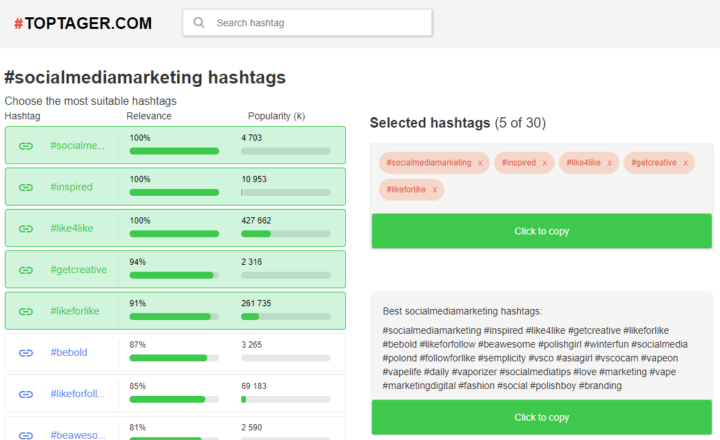
Dehaze is a very simple web-based tool that you can use to generate a list of relevant keywords given your niche and geographical location. Searching “drone” and “San Francisco” gave me this list:
#roamtheplanet #peoplescreatives #earthawesome #dronepic #dehazeco #fromwhereidrone #droneheroes #aerialphotography #dronestagram #dronegear #visualoflife #artofvisuals #openmyworld #exklusive_shot #agameoftones #folkgood #openmyworld #beautifuldestinations#california #igerssf #streetsofsf #wildbayare #visitcalifornia #onlyinsf #howsfseessf
That’s 25 hashtags. Instagram allows 30 hashtags on any given post, and there have been studies to suggest that the more hashtags the better. Check out this graphic from Buffer: according to one study, posts with hashtags got relatively more engagement the more hashtags they used. But posts with 11+ hashtags got the most engagement by far.

(Source: Buffer)
But when you start to add a ton of hashtags to each post you run a risk. It’s not the risk of appearing self-promotional (although that does exist), it’s the risk that you’re simply wasting your time by targeting keywords that aren’t going to help you grow.
Keep your hashtag strategy focused
Targeting a highly popular hashtag is a good way to get a piece of content in front of a lot of people, but if it doesn’t make sense with the rest of your content, you’re going to get an influx of bad followers (if any).
Your follower count will rise, you’ll feel happy about this, and you’ll even start targeting more of your content to hit that popular hashtag. Then, on a weekend night, around 1 or 2 in the morning, all those followers’ auto-unliking bots will unfollow you to bump their own follower/followed ratios up. And by then your whole content strategy will have been sidetracked because you were tempted into a larger niche by some temporary success.
More hashtags means more engagement, but keep your scope narrow at the beginning and pay close attention to how different hashtags affect the reception of your content. Don’t just stick thirty hashtags in every single post. Start with a few, change them around, and see what hashtags work best for bringing in users who stick around.
3. Start networking
Central to growing an Instagram account from scratch is doing cold outreach. You need to engage with people in your community if you want them to even know who you are, and you’ll have to engage with a lot of people to start getting traction. It’s like running for office—you’re going to be kissing babies and shaking hands.
When you go to someone’s Instagram profile, like a bunch of their pictures, leave some adoring comments, and follow them, the odds get pretty good that they will follow you back. It’s basic reciprocity—I’m more inclined to do something nice for you (like follow you, and therefore boost your follower count) if you have done something nice for me (like comment on my photos, validating me socially).
A word of warning
There are many automated services out there that will find other Instagram accounts, follow them, like a bunch of their pictures, and then unfollow them for you. And no, you should not use these.
Every service of that nature out there—and there are lots—runs off the same similar premise. You put in information about the hashtags you tend to target, or the account whose followers you want to target, and then give them your Instagram username and password. Their software hijacks your account and starts following and liking users at a rate that only a Kardashian could match—1,000-2,000 “likes” a day and 600 “follows,” for an idea of just how fast.
Even setting aside the inevitable “raptures” that Instagram performs on such accounts and the sheer likelihood of a ban given that you’re performing actions at superhuman speed from IP addresses around the world, automating the process of getting followers just doesn’t make sense.

These followers aren’t natural resources to be harvested. They’re people. To return to the startup analogy, the first “customers” (users) of your “product” (profile) shouldn’t just be a random group of people you found on the street. Startups that succeed build products that solve problems for a specific group of people.
If I’m posting pictures of cats one day, trucks the next, motivational entrepreneurship quotes whenever I feel like it and #fitspo pics when I hit the gym, I’m highly unlikely to find someone who is really into all of that. And no one wants to muddy their feed with someone who only posts something interesting 1 out of every 6 times. They might follow you purely out of reciprocity, but that’s not the kind of follow-back that will last.
To get good results from your following-liking-commenting outreach on Instagram, you need to both have a niche and target that niche.
Pick your targets
All you need for this process is 20 minutes a day. Go ahead, schedule it in your calendar. Here’s how it works:
- Find a place where your potential followers hang out
- Tap on the profile of someone who you think would follow you
- If their feed confirms your feeling, engage with them with a like, comment, share or follow
Repeating this process over and over is virtually the only way to kickstart growth on an organic Instagram account you’re building from scratch. Don’t be skeezy—don’t comment the same thing on a million different pictures (they can tell) and don’t just carpet bomb people with likes. That may get you noticed, and it may even get you some pity follows, but it’s not going to get you engaged followers.
Here are some tips to keep in mind while you’re “networking”:
- Go horizontal, not vertical: In real life, it’s always best to make friends with people who are on your level. Junior copywriters don’t go around trying to schmooze with CEOs at conferences—they find other copywriters. Do the same on Instagram. Don’t bother liking and commenting on the pictures of people who already have thousands of followers. Not only will they pay less attention to you, they have no real incentive to follow someone with a fraction of their follower count. Engage with people who have the same amount of clout as you—or less, which brings us to…
- Find champions: These are people (generally with less followers than you) that comment, share, and like your content like mad. If found and nurtured, these 10x fans are an incredible asset to have as you grow. The only way to identify a reliable source of champions is to test your content and hashtag strategy carefully, monitoring where your fair-weather followers come from and where you have real friends.
- Persistence is key: Don’t just like someone’s last three pictures, follow them, and then ignore them forever. It’s very transparent, and the Instagram unfollow tools out there today are sophisticated. Users can unfollow accounts that pull this kind of thing. If someone follows you back and likes, comments and shares your content on a regular basis, give it back to them occasionally. Reciprocity is the basis of all good relationships.
Growing slow
Look around and you will definitely find products and services that promise you much faster growth than 1,000 followers in a month.
You will see, as you look around Instagram, popular accounts that have clearly been built by robots. Accounts with 500,000 followers but only 10 likes on each post.
Don’t get distracted by all the vanity out there around social media.
Growing an Instagram account by hand and from scratch, developing a community of people who are actually engaged (not just commenting “nice :)” on every picture for exposure) and learning more about your niche is far more valuable, in the long-run, for your development as an entrepreneur or marketer or product-builder.

 Have a powerful Instagram account setup for your Business! Attract 10,000 real targeted followers to your Instagram account! Convert your new Instagram followers to long-term loyal paying customers who love your business! This must have course has a 4.4 rating out of 3,321 ratings with more than 23 thousand students enrolled.

 Learn how to market via Twitter, Pinterest, Instagram, YouTube, Facebook, Google and more advertising platforms! This must have course has a 4.7 rating out of 1,226 ratings with more than 12 thousand students enrolled.
 Wondering how to get started? What to pin? When to pin? How to get people to "follow" you so your business gets noticed? You need more traffic and sales — not another way to waste time on social media, right? You want someone to break it all down for you - to simplify and take you step-by-step, and ultimately.... to help you get more customers online!